
A digital dash can bring the information you need into one clear display, but the installation still needs to look at home in the car. Making a universal screen sit neatly in a curved factory instrument surround can take more work than expected.
Mako Motorsport makes vehicle-specific cluster mounts that place an aftermarket display in the original instrument position. Spool Imports now offers a selected range for Haltech iC-7 and uC-10 displays, covering popular Ford, Holden, Mitsubishi, Nissan, Subaru and Toyota applications.
The useful part is having the surround and mounting arrangement worked out for the vehicle. Choose the mount for the dashboard actually fitted to the car, then choose the Haltech display and electrical connection for the build.
What does a Mako dash mount replace?
The mount replaces the factory instrument cluster and provides a shaped panel for the digital display. It uses the original cluster mounting locations, giving the installation a finished surround rather than leaving a universal bracket and exposed gaps around the screen.
The Mako mount and Haltech display are separate components. A mount-only purchase does not include the display shown in the photographs. If you already own the correct Haltech dash, you can order just the matching mount.
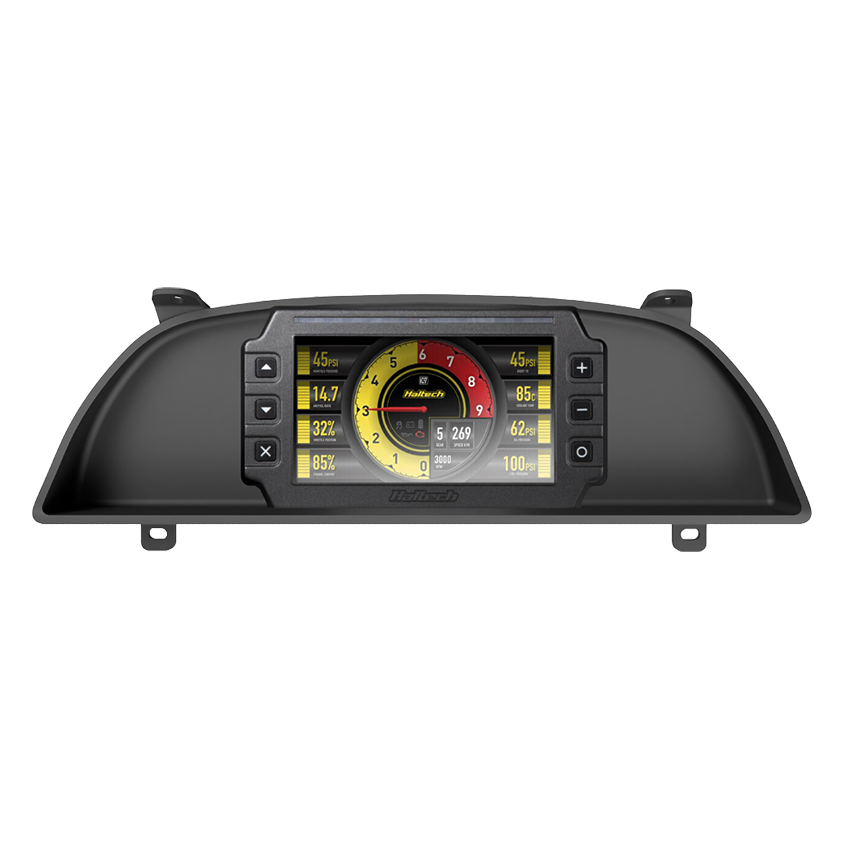
ABS construction with a hand-finished surface
Mako describes its mounts as 3D printed from ABS plastic, then hand processed, sanded and smoothed before painting. The final coating is a textured matte black 2K finish.
That finishing work matters in a part that sits directly in front of the driver. The aim is a consistent finished surface that works with the surrounding interior, rather than the exposed layer texture of an unfinished print. Mako describes the material and finish as resistant to heat, stress and chemicals; that is the manufacturer's description, rather than a Spool endurance-test result.
Choose the dashboard first, then the display
An RB, JZ, Barra or LS engine code can help you find relevant products, but it cannot identify the correct cluster surround. An LS-converted Nissan still needs the mount for its Nissan dashboard. Series changes and different cluster layouts matter even when the engine stays the same.
Start with the vehicle model, series and actual dashboard layout. Then select the mount made for the display you intend to install. The 7-inch iC-7 and 10-inch uC-10 use different display openings in these Mako mounts, so do not assume one surround suits both.
The larger screen is worth considering when you want more room for the layout, but first check the view from your normal driving position. The steering wheel, column adjustment and surrounding trim can matter more than the screen size on paper.
Which Haltech display suits the electrical setup?
The physical mount does not determine how the dash receives data. A display needs a compatible ECU connection or appropriately wired sensors. Start with the system already fitted to the car and the information you want to see.
| Installation | Starting point | What to confirm |
|---|---|---|
| Compatible Haltech ECU | iC-7 CAN package or uC-10 | ECU model, CAN configuration and the required cable. |
| Supported factory ECU | iC-7 OBD-II package, or a supported uC-10 OBD-II installation | CAN OBD-II compatibility, available channels and cable requirements. An OBD-II socket alone is not confirmation. |
| Direct sensor installation | iC-7 Stand-Alone Classic Kit or a suitably specified uC-10 setup | Sensor selection, harness, input configuration and calibration. |
Compare the Haltech iC-7 range and uC-10 range against the electrical plan. A mount that fits the car cannot make an unsupported data connection work.
Bolt-in mounting still needs an installation plan
Using the factory mounting points saves fabrication, but it does not mean every installation is free of trimming. Our uC-10 listings for the Mitsubishi Evo 7–9 require cuts to the plastic above the steering column, while the Supra Mk4 Series 1 listing specifies trimming above the display. Read the notes for the exact vehicle and display combination before removing any trim.
Removing the factory cluster also means checking the functions it carried. Fuel level, speed, indicators and warning lights need their own plan. Do not assume they will all arrive over the ECU connection. Haltech's uC-10 installation guide specifically covers wiring indicator and warning-light signals and configuring their switching thresholds.
For the workshop, the sensible sequence is:
- Confirm the vehicle series, dashboard layout and display model against the mount listing.
- Identify the ECU connection, sensors and original cluster functions that need to be retained.
- Test-fit the mount and display, checking the driver's view and any specified trimming.
- Check clearance behind the display for plugs and wiring before final assembly.
- Complete the wiring and configuration using the correct Haltech guide for the hardware.
- Test the displayed channels, indicators and warnings before refitting the surrounding trim.
Haltech's dash installation guides and wiring documents are useful here. They cover the electrical work that a vehicle-specific mount does not replace.
The range at Spool Imports
Our Mako Motorsport range focuses on vehicle applications that fit the builds we support, including Falcon, Commodore, Skyline, Silvia, Patrol, Evo, WRX/STI and selected Toyota models. Check the individual listing for the precise series and display fitment.
On each mount listing, the display option defaults to None – mount only. Leave it there if you already have the matching dash, or select a compatible Haltech display to purchase with the mount. Mako also offers a broader custom-design service, but extra gauge holes, LED indicators and other custom features are not automatically included in Spool's standard mount listings.
Frequently asked questions
Are Mako Motorsport mounts complete digital dashes?
No. A Mako cluster mount is the vehicle-specific panel that holds the display. The Haltech digital dash is a separate component and is included only when selected in the product options.
What are Mako dash mounts made from?
Mako describes its mounts as 3D printed ABS plastic, hand finished and painted with a textured matte black 2K coating.
Will an iC-7 Mako mount fit a uC-10 display?
Order the Mako mount specified for your display. The iC-7 and uC-10 versions have different display openings; matching mounting points on the displays do not make the finished surrounds interchangeable.
Does a Mako mount make the Haltech dash plug-and-play?
The mount provides the physical installation. The display still needs the correct power, wiring, compatible data connection or sensors, and configuration for the vehicle.
Do Mako dash mounts require cutting?
Some vehicle and display combinations require trimming. Spool's uC-10 Evo 7–9 and Supra Mk4 Series 1 listings include specific trimming notes, so check the exact product before installation.
Does an engine conversion change which Mako mount I need?
The dashboard and cluster layout determine the mount. An engine conversion may change the ECU, wiring and display configuration, but it does not by itself change the dashboard fitment.

